 Using the $2 Nike+ GPS iPhone app for tracking run distance and pace couldn't be simpler: start the Nike+ GPS app on your iPhone, drop the phone into your pocket, and start your run. Every kilometre (or mile if you prefer), your phone speaks your elapsed distance and current pace. At the the end of your run, it speaks your distance, time and pace, plays a congratulatory celebrity voice clip, and optionally uploads your run to the NikePlus.com website.
January 30, 2011
Nike+ GPS App for Runners
Using the $2 Nike+ GPS iPhone app for tracking run distance and pace couldn't be simpler: start the Nike+ GPS app on your iPhone, drop the phone into your pocket, and start your run. Every kilometre (or mile if you prefer), your phone speaks your elapsed distance and current pace. At the the end of your run, it speaks your distance, time and pace, plays a congratulatory celebrity voice clip, and optionally uploads your run to the NikePlus.com website.January 23, 2011
Using the Apple TV 2 with Logitech's Harmony 650 Remote

 $99, is small enough to fit in the palm of a hand and weighs just a few ounces. Connected to your TV with an HDMI cable, it wirelessly streams your iTunes music & video library, content from your AirPlay devices, YouTube, Netflix, and internet radio.
While the Apple TV comes with its own elegant remote, you must use yet another remote in order to switch your TV's input to the Apple TV and to adjust volume. Alternatively, you could replace the Apple Remote, as well as all your other remotes, with a single controller like the Logitech Harmony 650
$70.January 22, 2011
Bluetooth Mouse: Logitech V470
 I prefer Bluetooth wireless mice as there is no wireless dongle to get lost, tie up a USB port, or get caught on my laptop sleeve. The Logitech V470 Bluetooth mouse $40 is my current favourite:
January 16, 2011
OS X Keyboard shortcuts in Safari
Tags:
All,
AppleScript,
OSX,
tips,
UI

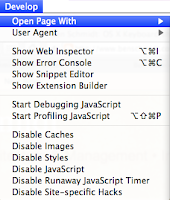
John detailed how to use OS X's Keyboard preference pane to create a keyboard shortcut to quickly open the current Safari webpage in Chrome. Over the following week I noticed that, while selecting from Safari's menu: Develop > Open Page With… > Google Chrome always worked, my keyboard shortcut was not reliable.
Subscribe to:
Posts (Atom)